
Use AI to Describe Images as a Background Job in Ruby on Rails
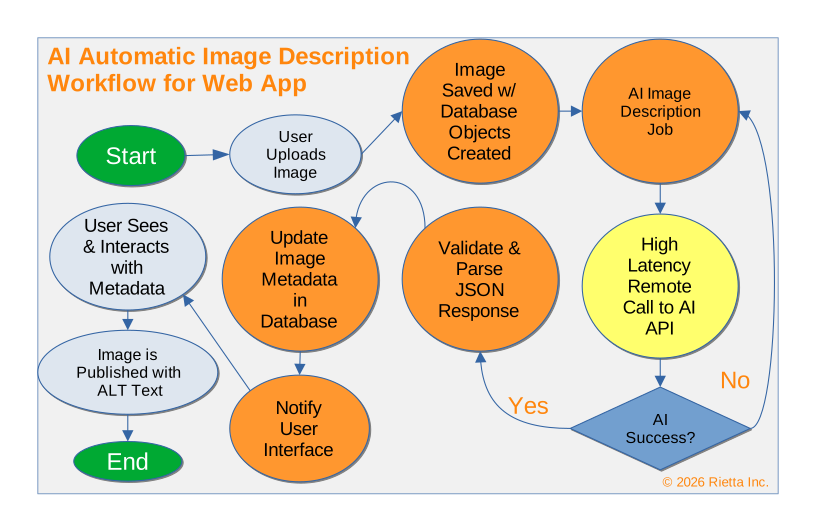
Recently I wrote about how I run a Local AI Setup with Ollama and Nvidia GPU on Ubuntu Linux, but today I want to touch a bit more about how one can fit Artificial Intelligence (AI) into your Ruby on Rails application.
At the risk of oversimplication, let’s start with an example: you allow users to upload an image to your Ruby on Rails application and provide a place for them to enter alternative text (the ALT HTML attribute) for each image that describes the content. However, in real life busy users often leave this field blank, thus leading to poor usability for those who need the assistance of screen readers. You can use AI to help with that.
I want you to think about how this can work differently. You don’t want to run an AI model synchronously on every request because it’s slow. Using a background job to run an AI model to assist can be a win for everyone involved. Viewers are served by the cached description. Your human editors can see and edit the text that is provided should they notice something is off. This is an important human-in-the-loop capability.
Important Note: All the code is real but it is not intended to be an end-to-end copy+paste solution. It may not even work exactly as presented. My use is more as pseudocode for instructional purposes.
The Architecture: From Request to Description
When integrating an LLM into a Rails workflow, you aren’t just making an API call; you are managing a distributed transaction where one participant is slow and unpredictable.
1. The State Machine Pattern
Because AI is a “black box” that can fail in various ways (hallucinations, safety filters, or timeouts), you should avoid a simple boolean processed flag. Instead, use a status column on your ImageAttachment or a dedicated AiTask record:
| Status | Meaning | Transition Trigger |
|---|---|---|
| pending | Uploaded, waiting for the worker to pick it up. | after_save callback. |
| processing | Request sent to the LLM; awaiting response. | Job execution start. |
| completed | ALT text received and sanitized. | Successful JSON parse. |
| failed | Permanent failure (e.g., image violates safety policy). | rescue block or safety filter. |
| flagged | Human-in-the-loop needed; the LLM confidence was low. | Human-in-the-loop logic. |
By tracking the request and its status specifically in your database you can be resilient and allow steps of the process to be completed separately or retried as necessary. This is very important.
2. Key Solution Components
Several components will be needed for a successful AI-as-background-job integration.
- The Gateway Interface: A service object (e.g., Ai::VisionClient) that wraps your API calls. This keeps your ActiveJob clean and makes it easier to swap Ollama for OpenAI later.
- The Prompt as Code: While prompts can be stored as YAML or similar, I prefer to make Ruby objects that subclass a BasePrompt object. This way I gain the full composability of inheritance and semantic invocation with my Ruby codebase.
- The Idempotency Guard: Ensure that if a job retries due to a network error, you don’t carry out destructive or unnecessary operations over and over.
- The Human-in-the-Loop UI: A simple Rails admin view (using something like ActiveAdmin) where an editor can filter for images where ai_generated: true and verify the content.
An important consideration in this process is the use of prompts as objects. In my last article, I gave the example of the AiOcrCorrection Ruby class that inherited from AiBase. It then overrode the prompt method to inject the instructions needed. The same approach applies here. Let’s consider the approach for an AiAltDescriptionPrompt below.
For those unfamiliar, the heredoc <<~LLM is a semantic Ruby feature for representing a multi-line string.
class AiAltDescriptionPrompt < AiBase
  def prompt
    <<~LLM
          Please provide verbose alt text to use for this image.
          Do not refer to the image as "the image", "this", or similar: there is no need for such a preamble, because we already know that this is an image.
          Simply thoroughly describe what is in the image.
          See the JSON example below and note that it doesn't mention the fact that we are generating a description for an image; that fact is implied.

          If possible, identify people, places, and things in the image.
          Verbosity and adjectives are encouraged.
          Your response will be used to describe this image in high detail to vision-impaired users.

          Additionally, parts of your response will be used to classify and categorize this image for use in bundling groups of assets.

          For example, we may wish to group images that feature scenic views, or that feature bodies of water, or that focus on a specific geographic region, or that focus on specific types of live music entertainment, or that focus on video game reviews.
          These are simply examples: please do your best to classify images.

          Please structure your response in JSON so that it may be easily parsed. Here is an example for you to follow:

          {
            "description": "A man and a woman are standing in a kitchen. They are both holding up strands of what appears to be fresh pasta. They are wearing black aprons over their clothes and seem to be enjoying themselves, possibly engaging in a cooking class or a culinary date night activity. Text near the top reads \"FUN DATE NIGHT IDEA HONOLULU, HAWAII,\" suggesting this is an activity for couples to enjoy in Honolulu.",
            "labels": [
              "Date Night", "Date Idea", "Man", "Woman", "Couple", "Kitchen", "Pasta", "Playful", "Happy", "Silly", "Cooking", "Cooking Class", "Honolulu", "Hawaii", "USA", "North America", "Apron", "Text Overlay", "Countertop", "Watch", "Blonde Hair", "Short Hairstyle"
            ]
          }
    LLM
  end
end
This prompt will be submitted through your AI api client along with another message for the image. The details can vary between different providers. You will need to check the documentation and also determine if you submit the file as a request to fetch and image or if you push Base64 encoded data for the image.
You will likely want to return a smaller version of the image to speed the process along. If you are using ActiveStorage in Rails, it might look something like this:
# get the file contents for a variant of size 600x600 and base64 encode its contents into a string.
image_data = Base64.strict_encode64(asset.file.variant(resize: '600x600').processed.download)
3. Semantic Invocation
In my opinion, the closer you can keep your set of objects to plain Ruby the easier it is to use within your application. This is why I really like the background job approach. Design a job that takes a few simple parameters that orchestrates the complex parts. Then monitor the status in your state machine for the completion of the job and return the result.
For example, suppose your invocation was something like:
    image_attachment = ImageAttachment.find(params[:id])
    DescribeImageAttachmentJob.perform_later(image_attachment)
That is extremely versatile and can be triggered by a controller action or even a callback hook within your model.
For example, instead it could be done like:
    class ImageAttachment < ApplicationRecord
        after_save :describe_image_if_needed

        def describe_image_if_needed
            return if self.alt_text.present?

            DescribeImageAttachmentJob.perform_later(self)
        end
    end
Do note that the background job will be executed by another process so reloading the record would be necessary if you were to block and wait in this process. That is why we implemented the state machine.
4. The Job Object
So what in practice might this job object look like? Filling it out a bit more yields something like:
class DescribeImageAttachmentJob < ApplicationJob
  queue_as :ai_processing

  # Use Rails 8.2+ smart retry logic for external APIs
  retry_on Net::ReadTimeout, wait: :polynomially_longer, attempts: 5

  # Fail fast if the image is missing
  discard_on ActiveRecord::RecordNotFound

  def perform(asset)
    # 1. Bookkeeping: Mark as processing
    asset.update!(ai_status: :processing)

    # 2. Preparation: Generate the prompt and image data
    # Note: Use `.processed` to ensure the variant exists before downloading
    variant = asset.file.variant(resize_to_limit: [600, 600]).processed
    image_data = Base64.strict_encode64(variant.download)

    prompt_instance = AiAltDescriptionPrompt.new()

    # 3. Execution: Call your Gateway Service
    # Ensure your client handles the 'response_format: { type: 'json_object' }'
    raw_response = Ai::VisionClient.new.describe(
      prompt: prompt_instance.prompt,
      image_base64: image_data
    )

    # 4. Parsing: LLMs are "chatty," so sanitize the JSON
    parsed = JSON.parse(raw_response)

    # 5. Completion: Update the original record
    asset.update!(
      alt_text: parsed["description"],
      ai_labels: parsed["labels"],
      ai_status: :completed,
      ai_generated: true
    )
  rescue JSON::ParserError => e
    asset.update!(ai_status: :failed, ai_error: "Invalid JSON from LLM")
    raise e # Re-raise to let ActiveJob retry if appropriate
  rescue StandardError => e
    asset.update!(ai_status: :failed, ai_error: e.message)
    raise e
  end
end
5. Human in the Loop
Maintaining a human-in-the-loop interface isn’t just a safety feature; it’s a design requirement for non-deterministic systems. As we delegate more cognitive tasks to background workers, our role as developers shifts from writing “Step A to B” logic to designing robust containers that can manage the unpredictability of AI agents.
6. Some Observations
If you are wondering why programming Ruby on Rails to shrink the image before sending it to the AI, consider that a large multi-megabyte image to an AI agent is going to slow things down. Additionally, AI agent will downsample the image itself anyway. We can speed this up by doing it ahead of time. The resize capability is built into Rails’ ActiveStorage.
Tracking the status of the job at nearly line-by-line basis is important to understand where things break down. Troubleshooting background jobs is hard. Log everything so you can tell at which step it broke. You will need to implement retry logic and avoid getting caught in an infinite loop.
A failure in AI isn’t just a 500 error. It can be a 200 OK that contains the text “I’m sorry, I cannot see this image.” Your background job needs logic to detect these “soft failures” and handle them as if they were errors.
The AI will sometimes return invalid, or mostly valid JSON. Often with text that proceeds an otherwise valid JSON object. You will likely need to handle this accordingly in real life, hence the comment in the example above about sanitizing the JSON.
7. Conclusion
I have shown how a prompt and some data preparation can be submitted to an AI agent for processing. The product is a distributed function call that is capable handling non-deterministic tasks that the AI engine is very adept at. However, distributed systems are high latency and can fail in unusual ways. Because you can’t use a standard database transaction across an external API, the State Machine is your transaction manager.Therefore logging, managing your state machine, handling errors is extremely important. AI models do not agree with each other and can take different actions on subsequent calls so do not forget that as we build more and more systems that use these capabilities maintaining a human-in-the-loop interface is vitally important.